Compatible with Chrome and Edge
Instruction Guide
We have a simple tutorial guide which explains the features of the software extension and what each button inside the extension does. Read our tutorial and welcome guide on how to use the extension to the fullest. Use all the features of this browser software.
If you are interested in other web extensions to install, you might wish to check out the Microsoft Bing Search with Rewards extension.
Microsoft Bing Search with Rewards Extension
It allows you to complete daily offers to get points.
Track the number of points you have currently and the rewards you can redeem with these points.
The ways to get points & get rewarded is search with Bing, browse with Microsoft Edge and shop at the Microsoft and Windows stores to earn rewards.
Sponsored Link:
Other useful extensions
Another extension which would be useful to install is the iCloud bookmarks extension.
It allows to keep your Chrome bookmarks on Windows synced up with the Safari bookmarks on your iPhone, iPad, and Mac.
iCloud will store your website bookmarks so it is accessible even on your iPhone and Mac.
Try these other two extensions and see if it will boost your daily productivity.
Free! This extension will help you keep track of work time.
Features:
Install and open.
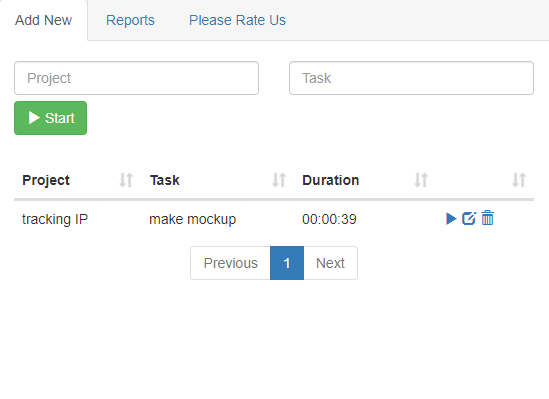
- After installing the extension. You click on the icon to begin time tracking.
Time tracking software is a popular way to manage your work. It helps you to stay on top of your projects, increase productivity and save time.
There are many time tracking software options available these days. Some are cloud-based, some are desktop-based and some run on mobile devices. They all have different features and functionalities, so it can be a challenge to figure out which one is right for you.
Here is a list of the most popular desktop time tracking software:
Time Doctor (Free trial)
Time Doctor is one of our favorite tools for tracking employee work time. The tool allows you to easily track your employees' computer use and get detailed reports on their productivity. Time Doctor is also very flexible and can be used in a variety of ways, including monitoring employees' computer use, tracking your own online activity and more.
Toggl (Free trial)
Toggl is another popular tool for tracking employee work time. Toggl lets you create detailed reports based on user activity, which makes it easy to see who's clocking in on time, who's surfing the web instead of working and more. It also has mobile apps for Android and iOS devices that let you track your work from anywhere around the world!
Harvest ($9 to $99 per month)
Harvest is a paid alternative to Toggl that offers many of the same features but doesn't have an unlimited free plan option like Toggl does. Harvest comes in three versions — Basic ($9 per month), Standard ($29 per month) and Premium ($99 per month). All versions include unlimited clients, contractors and employees, as well as invoicing features, automated reports and support for multiple currencies.
Tutorial:
- Install the Extension
-
After installing the extension, click on the icon
 on the toolbar.
Sponsored Link: